Bring Nostalgia to Your Web Design with Dilemma Script
As a web designer, I'm always on the lookout for typefaces that can add a unique and memorable touch to my projects. Recently, I had the opportunity to test Dilemma Script, a vintage bold script font, in a real website layout. The results were nothing short of impressive, and I’m excited to share my experience with you.
The Visual Charm of Dilemma Script
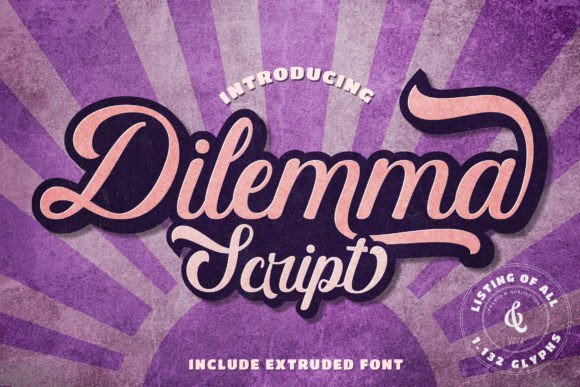
Dilemma Script is a premium font that exudes a nostalgic, retro vibe. Its bold, flowing lines and elegant curves make it a standout choice for adding a touch of personality and charm to any digital design. The font’s visual characteristics are reminiscent of classic hand-lettered signs and vintage advertisements, making it perfect for brands looking to evoke a sense of timelessness and authenticity.
Testing Dilemma Script in a Real Website Layout
I decided to test Dilemma Script on a boutique online store, where the brand identity needed to be both modern and nostalgic. The first place I used the font was in the hero section, where it served as the main headline. The bold, script style immediately caught the eye and set the tone for the entire site. The font’s natural flow and elegance made the text feel like a custom, hand-drawn piece, which added a personal and high-end touch to the design.
Next, I previewed Dilemma Script on mobile devices. The font scaled well, maintaining its readability and charm even on smaller screens. This is crucial for any responsive design, as it ensures that the user experience remains consistent across all devices.
Using Dilemma Script in Different Web Elements
Beyond the hero section, I experimented with Dilemma Script in various other elements of the website:
- Call-to-Action (CTA) Buttons: Using the font for CTA buttons added a playful and inviting feel. The boldness of the script made the buttons stand out, encouraging users to click and engage with the content.
- Section Headings: In the “About Us” and “Our Story” sections, Dilemma Script was used for headings. This created a cohesive and visually appealing narrative, reinforcing the brand’s storytelling and emotional connection with the audience.
- Product Descriptions: While not suitable for long paragraphs, Dilemma Script worked beautifully for short, decorative product descriptions. It added a touch of elegance and personality to the product pages, making each item feel special and curated.
Readability and Responsive Design
One of the key considerations when using a decorative font like Dilemma Script is readability. While it performs exceptionally well in larger sizes, such as headlines and CTA buttons, it may not be the best choice for body text or small, dense information. For these areas, I paired Dilemma Script with a clean, simple sans serif font, ensuring that the overall design remained balanced and legible.
Additionally, I tested Dilemma Script over image banners and dark backgrounds. The font’s boldness and clarity made it easy to read, even when placed over busy or dark visuals. This versatility is a significant advantage, as it allows for creative and dynamic use in various design contexts.
Font Pairing and Brand Consistency
To create a harmonious and professional look, I paired Dilemma Script with a clean, modern sans serif font for the body text. This combination provided a good balance between the decorative and functional aspects of the design. The sans serif font maintained readability and simplicity, while Dilemma Script added the necessary flair and personality.
For a more editorial or sophisticated feel, I also experimented with pairing Dilemma Script with a simple serif font. This combination worked well for a coaching website, where the goal was to create a sense of trust and expertise. The serif font added a touch of professionalism, while Dilemma Script brought a welcoming and approachable tone.
Final Considerations for Web Designers
Before incorporating Dilemma Script into your web projects, there are a few important considerations to keep in mind:
- Webfont Availability: Ensure that the font is available in webfont formats (e.g., WOFF, WOFF2) to ensure fast loading and compatibility across different browsers and devices.
- File Formats and Alternates: Check if the font includes multiple styles, alternates, and ligatures. These can add extra versatility and creativity to your designs.
- Multilingual Support: If your website needs to support multiple languages, verify that Dilemma Script has the necessary character sets and language support.
- Commercial Licensing: Always check the licensing terms, especially if you plan to use the font for client projects, online stores, or commercial products. Ensure that you have the appropriate license to cover all intended uses.
In conclusion, Dilemma Script is a versatile and charming typeface that can elevate the visual appeal and emotional impact of your web designs. Whether you’re working on a boutique online store, a coaching website, or a creative portfolio, this font offers a unique and memorable way to connect with your audience. Just remember to use it thoughtfully and pair it with complementary fonts to maintain readability and consistency.